
Razer has announced a new way for gamers to tweak their gear without installing any software, launching Razer Synapse Web in public beta. The browser-based tool is designed for fast, no-friction customisation, giving players instant control over supported keyboards from almost any PC with a modern web browser .
Unlike the full Razer Synapse desktop app, Synapse Web runs entirely through Chromium-based browsers such as Google Chrome, Microsoft Edge, and Opera. That makes it ideal for situations where installing software isn’t possible or practical—think LAN parties, esports tournaments, shared PCs, or locked-down work or school systems. Plug in your keyboard, open the browser, and you’re ready to go.
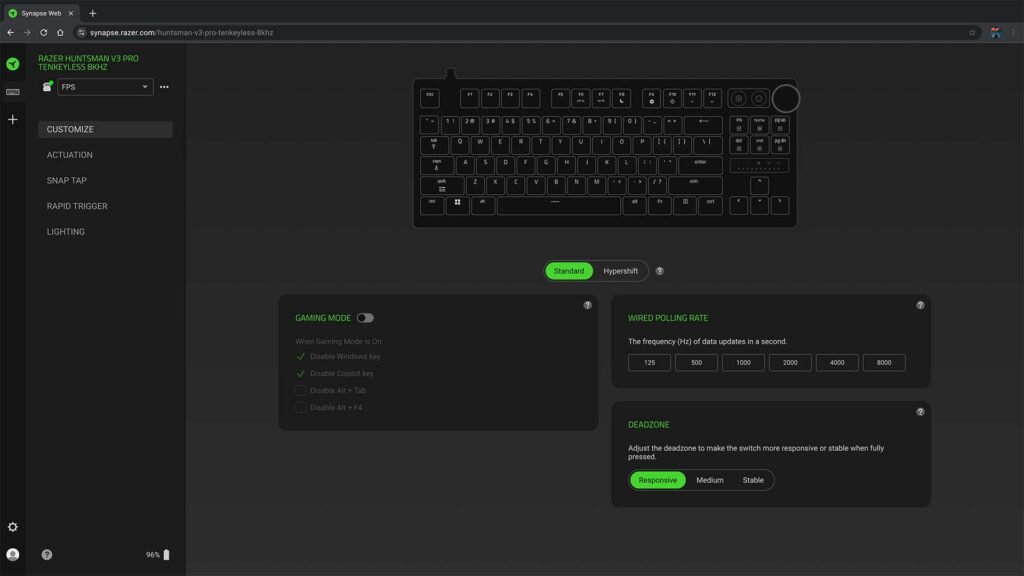
At launch, Synapse Web supports select high-end Razer Huntsman V3 keyboards, including the Huntsman V3 Pro, Pro TKL, and Pro Mini models. From the streamlined interface, users can quickly adjust essential settings, apply Chroma RGB lighting effects, and manage onboard profiles that are saved directly to the keyboard. This means your preferred setup travels with you, no matter where you’re playing.
The focus here is speed and simplicity. Synapse Web doesn’t try to replace the full Synapse 4 experience, which still offers deeper customisation, advanced lighting sync across multiple devices, and game-specific profiles. Instead, it acts as a lightweight companion—perfect for quick tweaks when time is tight or installs aren’t allowed.
Razer says the web app was developed with direct feedback from esports professionals and Team Razer athletes, reflecting real-world competitive needs where fast, reliable adjustments can make a difference mid-event.
Razer Synapse Web is available now as a free beta, giving gamers a flexible new way to stay in control of their gear—anywhere, anytime, with nothing more than a browser and a USB port for your hardware.